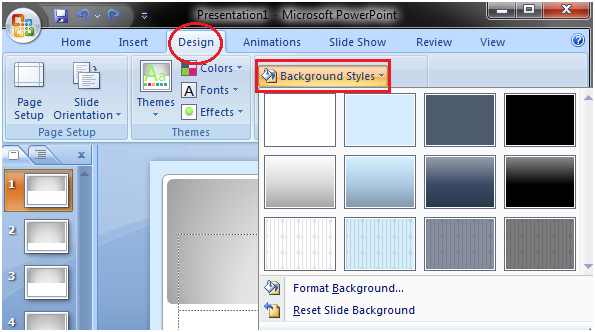
Home Office Tools How to Change the Background of a Theme Powerpoint Office ToolsPowerpoint Tutorial How to Change the Background of a Theme Powerpoint FacebookTwitter How to Change the Background of a Theme Open the Design tab Locate the Background group Click the Background Styles button Select the desired background style See the image: Next TopicHow to Delete Text RELATED ARTICLESMORE FROM AUTHOR Features of MS Excel VBA Nested If Statement Mac Excel Shortcuts Excel Insert Row Shortcut Excel New Sheet Shortcut MS Excel: Ribbon and Tabs 65FansLike3FollowersFollow EDITOR PICKS Analysis ToolPak Add-in Excel Hide Shortcut How to sum a column in Excel Excel mid function