


Multiple Loops in Excel VBA
To add a command button click on “Insert” and then select “Command Button” from ActiveX group.
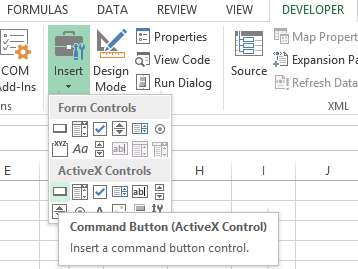
Create a command button.

Write click on the command button and Select “View Code“.
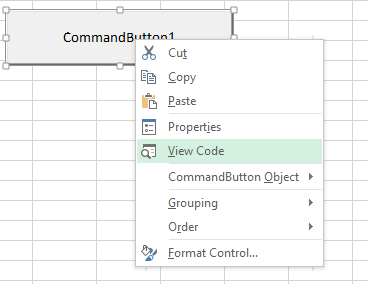
Write this line of code. After writing the code, close the window by clicking on the red X button on the top left of the screen.
Dim i As Integer, j As Integer
For i=1 To 1 to 6
For j=1 To 2
Cells (i, j).Value=100
Next j
Next i

Click on the command button to see this result.

That’s it!
Template
You can download the Template here – Download
Further reading:
Basic concepts
Getting started with Excel
Cell References


