


BMI calculator in Excel
 On an empty cell, example C1, click on it (1), divide the weight by height, and add ^2 (2), and press enter.
 Click on another empty cell (D1) (1), and type =IF(AND(C1>=18.5,C1<=25),”Normal”) (2).
Click on another empty cell (E1) (1), and type in what is showing in 2 in the picture below.

Click on another empty cell (1), and type in number 2.
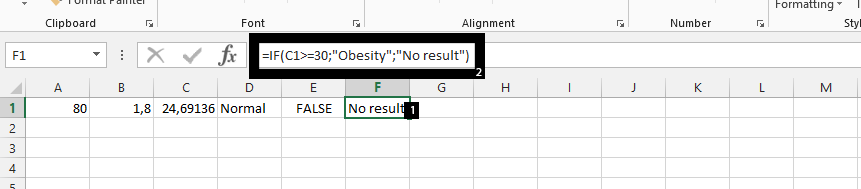
In conclusion, if it happens that the person is below 18.5, then such person is under weight, and the 80 is in kilogram, while 1.8 was in meter, which means the person is 180cm in height.
Template
You can download the Template here – Download
Further reading:
Basic concepts
Getting started with Excel
Cell References


